
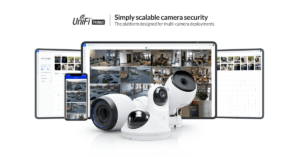
Ubiquiti’s UniFi Protect is an advanced and scalable video surveillance solution designed to integrate with the wider UniFi ecosystem. Offering an impressive suite of cameras, smart analytics, and intuitive cloud-based management, UniFi Protect has become a popular choice for residential, commercial, and industrial applications. This article takes a deep dive into all the components of the UniFi camera security system, exploring the features, strengths, and weaknesses of each.
What is UniFi Protect?
UniFi Protect is a comprehensive video surveillance platform from Ubiquiti that is part of the larger UniFi ecosystem. It allows users to monitor, record, and manage video footage from multiple cameras in a single, user-friendly interface. UniFi Protect offers both local and remote access, providing real-time alerts and customizable notifications through the UniFi Protect mobile app.
The platform integrates seamlessly with Ubiquiti’s networking and access control systems, creating a cohesive security infrastructure.
Key Components of the UniFi Camera Security System
1. UniFi Protect Cameras
UniFi Protect includes a variety of cameras designed for different environments and applications. The cameras are IP-based, powered via Power over Ethernet (PoE), and can be managed from the UniFi Protect app or UniFi Cloud Key Gen2+.
a) UniFi G4 Pro
The UniFi G4 Pro is UniFi’s flagship camera, offering 4K video resolution and advanced low-light performance. This camera is ideal for critical surveillance areas where high-definition footage and zoom capabilities are essential.
Key Features:
- 4K video resolution (3840×2160).
- 3x optical zoom.
- Infrared LEDs for night vision (up to 30 meters).
- IP67 weatherproof rating for outdoor use.
Pros:
- Outstanding video quality in both day and night conditions.
- Great for large spaces or areas needing detailed surveillance.
- Optical zoom allows for flexible viewing and detailed monitoring.
Cons:
- High price point.
- Overkill for smaller residential setups.
b) UniFi G4 Bullet
The UniFi G4 Bullet is a versatile outdoor camera offering excellent 1440p HD resolution. Its compact design and wide field of view make it suitable for general-purpose outdoor surveillance.
Key Features:
- 4 MP sensor with 1440p HD resolution.
- 24 FPS video recording.
- Infrared night vision up to 25 meters.
- Weatherproof (IPX4 rating).
Pros:
- Affordable yet powerful for most outdoor applications.
- Compact and discreet design.
- Great low-light performance.
Cons:
- Lacks the optical zoom of higher-end models like the G4 Pro.
- Only IPX4 rated, offering less weather protection than the G4 Pro.
c) UniFi G4 Dome
The UniFi G4 Dome is an indoor/outdoor camera that offers discreet monitoring with full HD 1440p resolution. Its dome-shaped design helps to reduce tampering, making it ideal for public-facing areas like lobbies, retail spaces, or hallways.
Key Features:
- 1440p video resolution.
- Infrared night vision (up to 10 meters).
- IPX4-rated for light weather resistance.
Pros:
- Discreet and tamper-resistant design.
- Ideal for indoor spaces or semi-outdoor areas.
- Affordable and easy to install.
Cons:
- Limited night vision range.
- Not as weatherproof as other outdoor models.
d) UniFi G5 Flex
The UniFi G5 Flex is a budget-friendly, versatile camera that offers 1080p resolution and a wide field of view. Its compact design allows it to be mounted in various configurations (wall, pole, or ceiling), making it ideal for both indoor and outdoor use.
Key Features:
- 1080p HD resolution.
- Flexible mounting options.
- Weather-resistant for outdoor use.
Pros:
- Very affordable compared to other UniFi cameras.
- Compact and flexible for tight spaces.
- Easy to install with multiple mounting options.
Cons:
- Limited to 1080p resolution, which may not be sufficient for detailed surveillance.
- No optical zoom capabilities.
e) UniFi G3 Instant
The UniFi G3 Instant is a highly affordable, entry-level camera with 1080p video and two-way audio. Designed for indoor applications, it is a great option for home security or small office monitoring.
Key Features:
- 1080p video resolution.
- Integrated microphone and speaker for two-way communication.
- Wi-Fi-enabled (no PoE required).
- Compact design for easy placement.
Pros:
- Extremely affordable.
- Perfect for basic indoor monitoring.
- Two-way audio is great for communication.
Cons:
- Limited to indoor use (no weatherproofing).
- Lacks advanced features like zoom and AI analytics.
2. UniFi Protect Network Video Recorders (NVRs)
To manage and store video footage from multiple cameras, UniFi Protect offers dedicated NVR solutions. These devices centralize video storage and management, integrating with the UniFi Controller and allowing for scalable surveillance setups.
a) UniFi Cloud Key Gen2+
The UniFi Cloud Key Gen2+ serves as both a local NVR and a cloud gateway. It includes a small internal hard drive for video storage and hosts the UniFi Protect software.
Key Features:
- 1 TB internal HDD (expandable).
- Supports up to 20 cameras.
- Remote access through UniFi Cloud.
- Integrated with other UniFi devices (Switches, Access Points, etc.).
Pros:
- Easy to set up and manage.
- Small form factor and affordable for small-to-medium deployments.
- Unified management with the UniFi ecosystem.
Cons:
- Limited storage (requires external storage for large-scale installations).
- Best for small setups, as it can handle only around 20 cameras effectively.
b) UniFi Protect NVR
The UniFi Protect NVR is a dedicated NVR for larger setups. It comes with more storage and can handle more cameras than the Cloud Key Gen2+.
Key Features:
- 2 TB or 4 TB storage options (expandable).
- Supports up to 50+ cameras.
- Full UniFi Protect integration.
Pros:
- Ideal for larger installations with numerous cameras.
- Scalable storage options for long-term video retention.
- Centralized video management with real-time alerts.
Cons:
- More expensive than the Cloud Key Gen2+.
- Requires network and hardware expertise for configuration.
3. UniFi Protect App and Cloud Services
The UniFi Protect App offers an intuitive interface for managing video streams, setting up cameras, and reviewing footage. It works across both desktop and mobile devices, giving users access from anywhere.
Key Features:
- Live video feeds and playback of recorded footage.
- Real-time notifications for motion detection or security events.
- Full camera management from a single interface.
- Cloud access for remote monitoring.
Pros:
- Extremely easy to use, even for beginners.
- Cloud-based access means you can monitor your system from anywhere.
- Works seamlessly with the broader UniFi ecosystem, including network and access control systems.
Cons:
- Requires reliable internet access for remote functionality.
- Local storage on the NVR means cloud storage isn’t built-in; additional cloud services may be necessary.
Use Cases and Recommendations
1. Residential Use
For home security, the UniFi G3 Instant and UniFi G4 Dome cameras offer excellent indoor monitoring. The UniFi G4 Bullet is perfect for outdoor use due to its weatherproof rating and infrared night vision. Small residential setups can use the Cloud Key Gen2+ to store and manage footage, providing a complete solution that is affordable and easy to maintain.
Recommendation:
- Best cameras: UniFi G3 Instant (indoor) + UniFi G4 Bullet (outdoor).
- Best NVR: Cloud Key Gen2+.
- Pros: Affordable, easy to set up and manage.
- Cons: Limited storage capacity for large homes with multiple cameras.
2. Small to Medium Business Use
For small to medium businesses, the UniFi G4 Dome and G4 Bullet provide comprehensive indoor and outdoor coverage. Businesses can benefit from the higher-resolution G4 Pro for sensitive areas such as cash registers or high-security zones. For NVR, either the Cloud Key Gen2+ or UniFi Protect NVR can be used depending on the scale of the installation.
Recommendation:
- Best cameras: UniFi G4 Dome + UniFi G4 Bullet + G4 Pro for critical areas.
- Best NVR: UniFi Protect NVR (for larger setups).
- Pros: Scalable, centralized management.
- Cons: Requires initial investment in multiple cameras and storage solutions.
3. Large Commercial/Industrial Use
For large enterprises, the UniFi G4 Pro will be essential for critical zones, while G4 Bullets and G4 Domes can cover general areas. With multiple entry points and zones to monitor, the UniFi Protect NVR with expanded storage would be the best option for long-term video retention and management of many cameras.
Recommendation:
- Best cameras: UniFi G4 Pro (critical zones), G4 Bullet (outdoor), G4 Dome (indoor).
- Best NVR: UniFi Protect NVR with
